
WhatsApp Business logo
Twenty CRM logo

WhatsApp integration for Twenty CRM

Connect your WhatsApp Business account to Twenty CRM — every chat becomes a contact, automatically.

Built by Twenty CRM partner

We are official implementation partner since 2025.

Built with official Meta APIs

We are Meta Tech Provider and use official APIs, so your WhatsApp is not compromised.

Every WhatsApp lead, inside Twenty CRM

When your business runs on WhatsApp, things get messy fast. With more than one number, it gets messy exponentially - leads are in chats, not in your pipeline.

The Twenty WhatsApp integration fixes the foundation: every lead that messages you on WhatsApp lands in one place, your Twenty CRM. Your team gets immediate insight - leads per day and per month, and how this quarter compares to the last.

This Twenty CRM WhatsApp integration links your WhatsApp Business account directly to Twenty, on cloud or self-hosted instances. Setup takes minutes and needs no code.

From there you can go deeper into WhatsApp automation: track conversations, send smart replies, update deal stages and report on it all.

Book a WhatsApp integration consultation

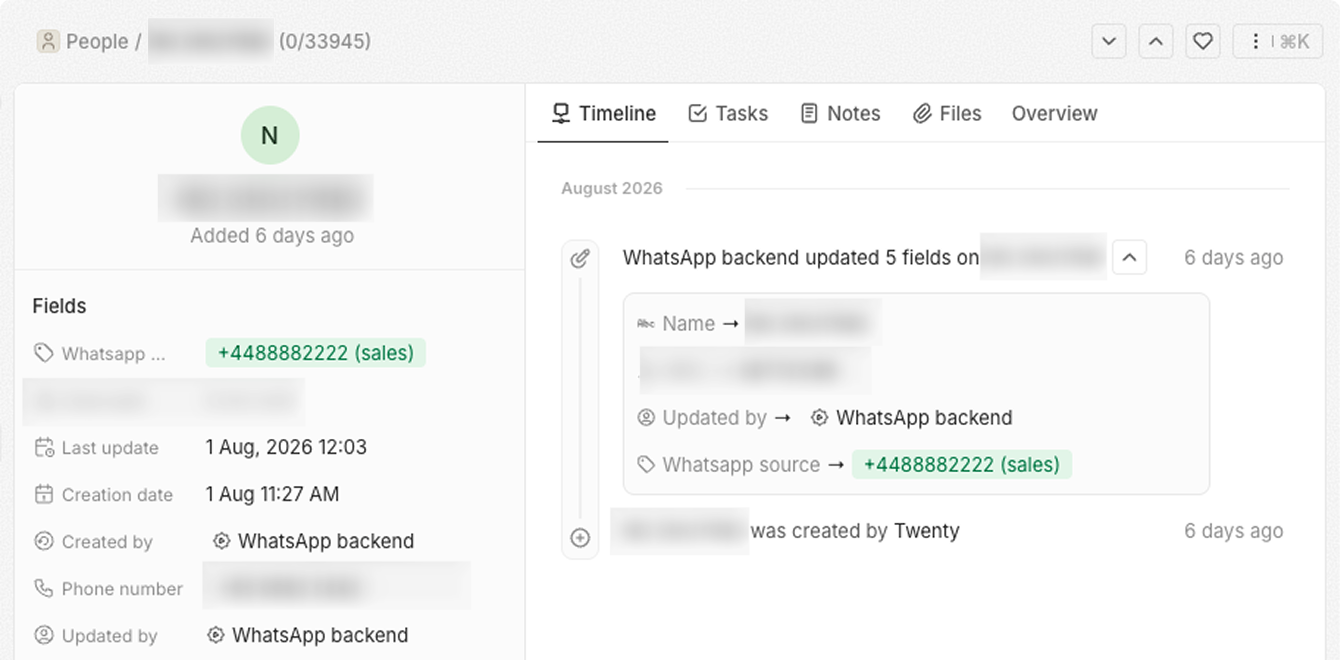
How Whatsapp integration looks like inside Twenty

A Twenty CRM contact record created by the WhatsApp integration, with the WhatsApp number, lead source and an activity timeline of the fields WhatsApp updated.

Get every lead from WhatsApp

Everyone who whatsapped you becomes a contact in Twenty with their number, name and your Whatsapp number that they messaged. It's reflected in the timeline so the team is in the know.

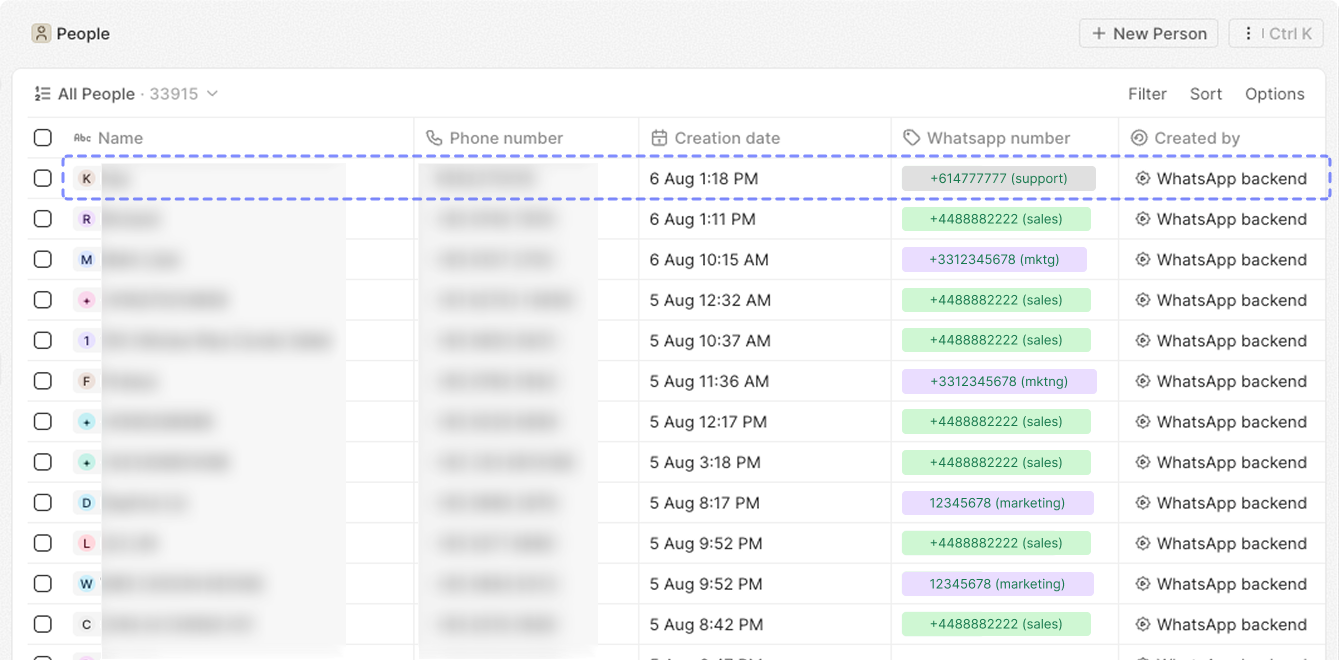
The People list in Twenty CRM showing leads captured from several WhatsApp Business numbers, each tagged with its own WhatsApp number and created by the WhatsApp backend.

See leads from all your phones

See all leads, from all your connected numbers. Know who came from Sales, Marketing, or specific person's Whatsapp.

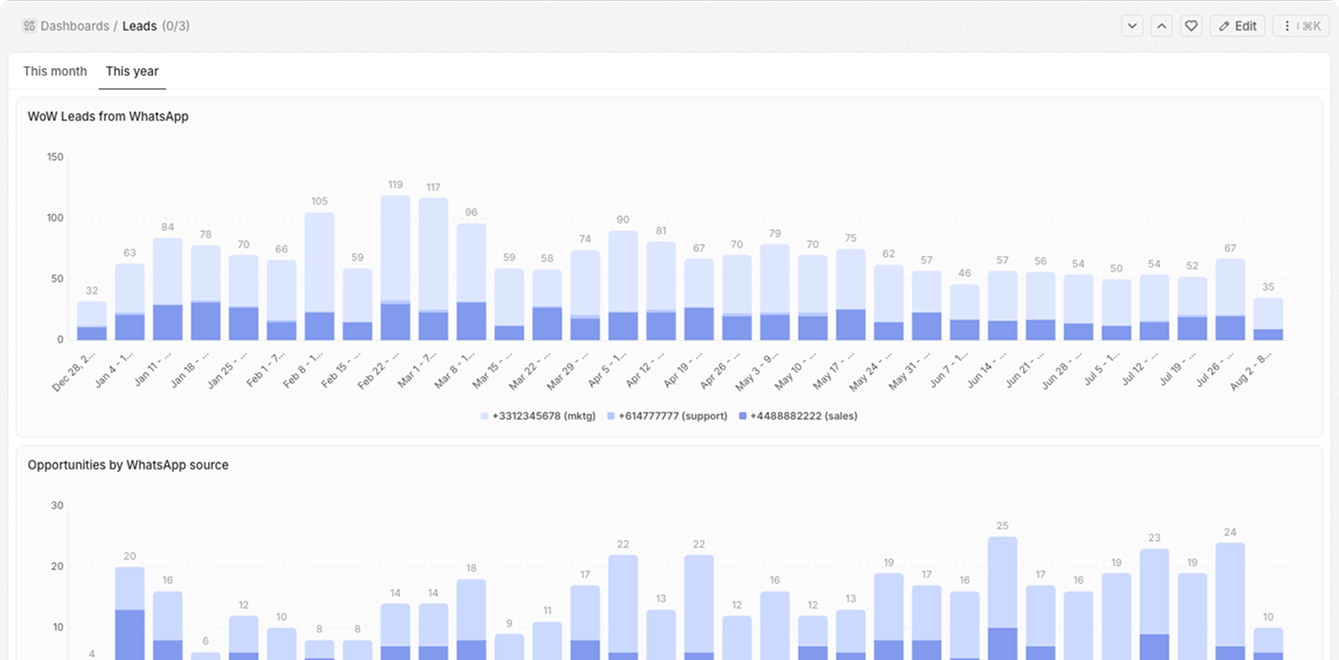
A Twenty CRM dashboard charting week-over-week WhatsApp leads and opportunities, broken down by WhatsApp Business number.

Get insights on the sources

Create dashboards to analyze Whatsapp engagement: what sources generate leads, what sources create more Opportunities

How to connect WhatsApp to Twenty

  1. Install the Twenty WhatsApp app. In your Twenty CRM instance, install the “Twenty WhatsApp” app from 9dots.
  2. Authorise your WhatsApp Business account. You keep your existing number, and nothing changes for the people messaging you.
  3. Watch WhatsApp leads land in Twenty. New chats create or update contacts with the name, phone number and WhatsApp as the lead source.

Need the wider picture first? See how we implement Twenty CRM end to end, or explore WhatsApp automation beyond contact capture.

What we’ve built on top of this

Case study · twenty.com

Twenty CRM for a WhatsApp-first real estate business in Singapore

Instead of asking sales reps to update CRM, we integrated Twenty with their WhatsApps. The team does zero data entry, management has real-time insights, and the company saw record growth after implementation.

+50%
stage conversion rate
2,000+
processed messages a day
15%
QoQ revenue growth
Read the full case study on twenty.com
Talk to us about your WhatsApp setup
Questions?

Twenty CRM WhatsApp integration FAQ

9dots - official Twenty CRM partner

made with ❤️ from 9dots